> For the complete documentation index, see [llms.txt](https://docs.unimarket.com/llms.txt). Markdown versions of documentation pages are available by appending `.md` to page URLs; this page is available as [Markdown](https://docs.unimarket.com/documentation/punchout/erp-punchout-to-unimarket-technical-information.md).
# ERP Punchout to Unimarket (Technical Information)
The **Punchout (Roundtrip) process** is a standardized method for a user to leave their internal ERP system, shop within the Unimarket eMarketplace, and return a populated shopping cart to their ERP for approval and requisitioning.
{% hint style="info" %}
For a business-level overview of why and how to set up a marketplace punchout, see [eMarketplace Punch-out (ERP to Unimarket)](/documentation/punchout/emarketplace-punchout-erp-to-unimarket.md).
{% endhint %}
## The Three-Phase Punchout Process
The entire interaction happens through three primary cXML messages:
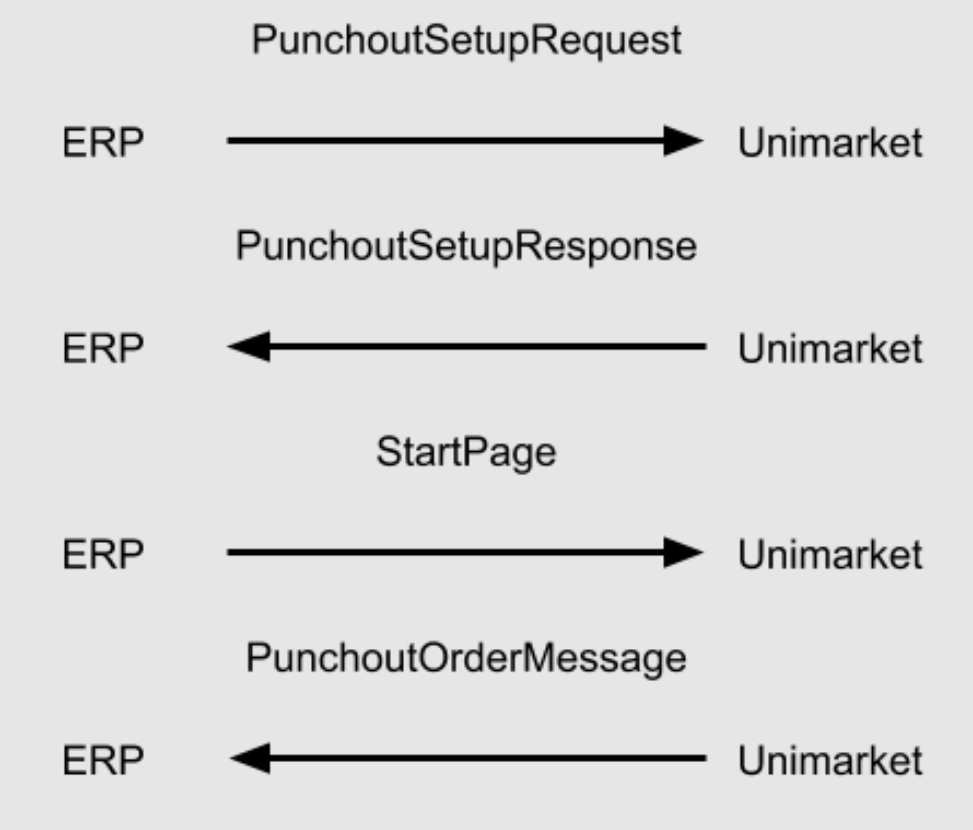
### 1. Punchout Setup Request (ERP → Unimarket)
The ERP initiates a session by sending an HTTPS POST request to Unimarket. This message establishes the user's identity and provides a "return address" for the cart.
**Key attributes:**
* **Community ID:** Identifies the specific Unimarket customer community.
* **System Credentials:** The `Identity` and `SharedSecret` for authentication.
* **Buyer Username:** The specific user shopping in the session.
* **BrowserFormPost:** The URL where Unimarket must send the final shopping cart data.
**Example request:**
```xml
cb897379-12df-4a5f-ab87-05709517f44b
5cd5ed4c-09c3-4c51-871d-3cde84e09556
SuperSecretPasswordHere
Unimarket Testing System.
NA
TestPunchoutUser
https://your.procurement.system.com
```
### 2. Punchout Setup Response (Unimarket → ERP)
Once Unimarket authenticates the request, it creates a unique session and responds immediately.
* **The StartPage URL:** This is the most critical element of the response. The ERP must take this URL and open it in the user's web browser. This URL automatically logs the user into the Unimarket home page without requiring a second login.
**Example response:**
```xml
https://miketest.unimarket-demo.com/app/home?cid=c7c69828-ab1a-4ab0-a7a1-f77a199d9c3d
```
### 3. Punchout Order Message (Unimarket → ERP)
After the user selects their items and clicks "Checkout" within Unimarket, the system redirects the user's browser back to the ERP.
* **Mechanism:** Unimarket performs a POST to the `BrowserFormPost` URL provided in Phase 1.
* **Data Payload:** The cart details are included in a parameter named `cxml-urlencoded`.
* **Requirement:** The ERP system must URL-decode this parameter to retrieve the valid cXML, which contains line-item details like SKU, quantity, price, and UNSPSC codes.
**Example Punchout Order Message (URL-encoded):**
```xml
cb897379-12df-4a5f-ab87-05709517f44b
cb897379-12df-4a5f-ab87-05709517f44b
SuperSecretPasswordHere
UMKT
NA
4.00
20.00
$20.00 per order
1000010
1.00
Product Code 10
EA
44000000
```
**Example Punchout Order Message (decoded to XML):**
```xml
cb897379-12df-4a5f-ab87-05709517f44b
cb897379-12df-4a5f-ab87-05709517f44b
SuperSecretPasswordHere
UMKT
NA
4.00
20.00
$20.00 per order
1000010
1.00
Product Code 10
EA
44000000
```
## Technical Implementation Details
### Setup Request Configuration
The request must be sent as an HTTPS POST to the community-specific web service URL (e.g., `https://miketest.unimarket-demo.com/ws`).
{% hint style="info" %}
**Example setup logic:** If the `From` identity is `cb897379...`, the Unimarket system recognizes the specific tenant and validates the `SharedSecret` against the credentials stored in the community's Integration settings.
{% endhint %}
### The Return Handshake
The return process is "transparent" to the user. When they finish shopping, Unimarket bundles the `PunchOutOrderMessage` (containing the cart) and sends it via the user's browser back to the ERP. This allows the ERP to "grab" the items and populate a draft requisition automatically.
## Troubleshooting Common Issues
* **401 Unauthorized:** Usually caused by a mismatch in the `SharedSecret` or a missing `unimarket-id` in the header.
* **StartPage Not Opening:** Ensure the ERP is configured to handle the `PunchOutSetupResponse` synchronously and can redirect the browser session to the provided URL.
* **Empty Cart on Return:** Check that the `BuyerCookie` in the Order Message matches the cookie sent in the initial Setup Request.
---
# Agent Instructions
This documentation is published with GitBook. GitBook is the documentation platform designed so that both humans and AI agents can read, navigate, and reason over technical content effectively. Learn more at gitbook.com.
## Querying This Documentation
If you need additional information that is not directly available in this page, you can query the documentation by asking a question.
Perform an HTTP GET request on the following URL with the `ask` and `goal` query parameters:
```
GET https://docs.unimarket.com/documentation/punchout/erp-punchout-to-unimarket-technical-information.md?ask=&goal=
```
`ask` is the immediate question: it should be specific, self-contained, and written in natural language.
`goal` is what the user is ultimately trying to achieve, the reason they need the answer. Sharing it helps GitBook give you a better, more relevant answer. A goal is most helpful when it describes the outcome the user wants rather than restating the question. For example, with `ask=how do I create an API token`, a goal like `automate deployments from our CI pipeline` lets GitBook tailor the answer to that use case.
The response will contain a direct answer to the question and relevant excerpts and sources from the documentation.
Use this mechanism when the answer is not explicitly present in the current page, you need clarification or additional context, or you want to retrieve related documentation sections.